---
title: "HubSpot CMS vs WordPress: Pros, Cons, Costs, and the Winner in 2026"
description: Comparing HubSpot CMS vs WordPress in 2026. See real pros, cons, pricing, AI tools, SEO, security, and which platform fits your business.
image: https://torro.io/hubfs/HubSpot%20CMS%20vs%20WordPress%20Pros%20Cons%20Costs%20and%20the%20Winner%20in%202026%20BG.jpg
---
[Web Design](https://torro.io/blog/tag/web-design) [Business](https://torro.io/blog/tag/business)
# HubSpot CMS vs WordPress: Pros, Cons, Costs, and the Winner in 2026
By [ Matt Sullivan ](https://torro.io/blog/author/matt-sullivan)
January 14, 2026
7 Minute Read
Choosing between HubSpot CMS and WordPress isn’t a simple technical decision anymore.
It’s an operating model decision.
Both platforms are mature. Both power serious businesses. And both have evolved fast over the last two years, especially around performance, security, and AI.
The real difference comes down to how much control you want vs how much you want managed for you and how tightly your website needs to connect to marketing, sales, and data.
We’re in a rare position here. We’re a HubSpot Partner. Our own site (this one) runs on HubSpot CMS. And we build the majority of client websites on WordPress, which I built my first website on back in 2007.
That means we see both sides clearly. The upside. The friction. The hidden costs. The tradeoffs people only notice six months after launch.
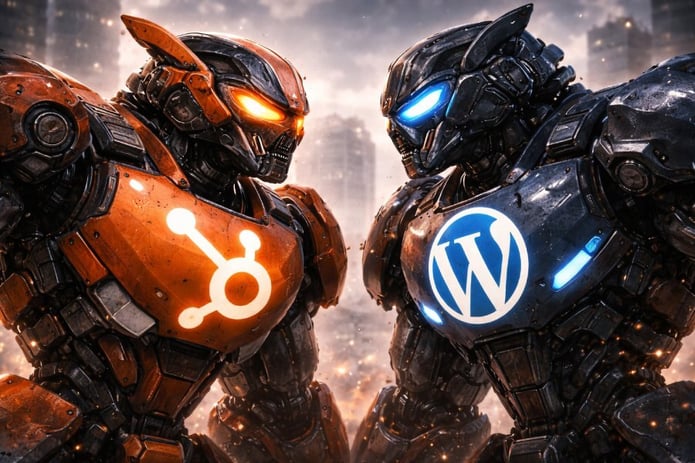
*Let the battle begin!*
### TLDR / Key Summary: HubSpot CMS vs WordPress
- HubSpot CMS is an all-in-one, fully managed platform built for marketing teams
- WordPress is an open, flexible CMS built for control and customization
- HubSpot reduces technical overhead but costs more at scale
- WordPress is cheaper to start but requires active management
- HubSpot wins on CRM, personalization, analytics, and security out of the box
- WordPress wins on ownership, extensibility, and long-term flexibility
- AI is now part of both ecosystems, but implemented very differently
## HubSpot CMS vs WordPress Comparison
| Category | HubSpot CMS | WordPress |
| --- | --- | --- |
| **Analytics** | Native CRM-level attribution | External tools required |
| **Personalization** | CRM-driven smart content | Limited, plugin-based |
| **Customization** | High, within HubSpot ecosystem | Extremely high, full control |
| **E-Commerce** | Integrations and basic payments | Full stores via WooCommerce |
| **AI Tools** | Native AI (Breeze) | Plugin-based AI tools |
| **Performance** | Automatically optimized | Depends on hosting and setup |
| **Staging** | Page-level staging | Full-site staging via host/plugins |
| **Support** | Official support included | Community or agency support |
| **Cost Structure** | Higher, predictable | Lower entry, variable over time |
| **Best For** | Marketing-led teams, scale | Flexibility, ownership, content |
Note: Plugin-based (Yoast, Rank Math) applies to WordPress SEO workflows.
## Platform Overview
### HubSpot CMS
HubSpot CMS is part of the larger HubSpot platform. That includes CRM, marketing automation, email, analytics, personalization, and sales tools.
Your website lives inside HubSpot’s cloud infrastructure. Hosting, updates, security, and performance are all handled for you.
This is designed for marketing teams who want speed, reliability, and tight data integration without worrying about servers or plugins.
Best fit:
- Marketing-led organizations
- B2B companies
- Lead-driven businesses
- Teams already using HubSpot CRM
### WordPress CMS
WordPress is open-source software. You install it on your own hosting provider or use a managed WordPress host.
There are two versions:
- WordPress.com (hosted, limited, not ideal for businesses)
- WordPress.org (self-hosted, full control, what most businesses use)
With WordPress, you own everything. Code. Hosting. Data. Structure.
That freedom is powerful. It also means responsibility.
Best fit:
- Businesses that want maximum control
- Content-heavy sites
- Custom functionality
- Teams with technical support or agencies

## Editability and Page Building
### HubSpot CMS Editing
HubSpot uses a drag-and-drop editor built around sections, columns, and modules.
Editors can:
- Rearrange layouts visually
- Adjust spacing, alignment, and responsiveness
- Publish changes instantly
- Maintain brand consistency through theme controls
This strikes a balance between flexibility and guardrails.
Marketers can move fast without breaking the site.
2 Minuite Demonstation Video:
### WordPress CMS Editing
WordPress now ships with the Gutenberg block editor.
Out of the box, it allows:
- Drag-and-drop blocks
- Media embedding
- Basic layout control
Most production sites extend this with builders like Elementor or custom themes, which can dramatically change the editing experience.
Flexibility is high. Consistency depends on implementation.
4 Minute Demonstation Video:
## Security
### HubSpot CMS Security
Security is managed for you.
Included by default:
- SSL
- DDoS protection
- Web application firewall
- Automatic updates
- Monitoring and threat mitigation
- Limited plugin surface area
For most teams, security becomes a non-issue.
### WordPress Security
WordPress security is your responsibility.
You’ll need:
- Secure hosting
- Regular core and plugin updates
- Security plugins
- Backups
- Monitoring
It can be very secure. It just requires discipline. You'll want to hire a dedicated Wordpress Maintenance team to handle this for you. Yes, you can update plugins on your own, but we often see people forget to stay on top of this which can lead to vulnerabilities.
This is where many WordPress sites fail quietly over time.
## Infrastructure and Hosting
### HubSpot CMS Infrastructure
HubSpot handles:
- Hosting
- CDN
- Scaling
- Caching
- Uptime
- Performance optimization
You don’t manage servers. You don’t choose vendors. It’s all bundled.
Predictable and boring in a good way.
### WordPress Infrastructure
With WordPress, your host is your infrastructure.
Quality varies wildly.
A good host can outperform HubSpot. A bad host can destroy performance and SEO.
Choosing the right host matters more than the CMS itself. If you're going to go with Wordpress, the [best Wordpress Hosting](https://torro.link/kinsta) by far is [Kinsta](https://torro.io/wordpress-hosting). We wouldn't host with anyone else when it comes to building a Wordpress CMS website.
## Analytics and Data
### HubSpot CMS Analytics
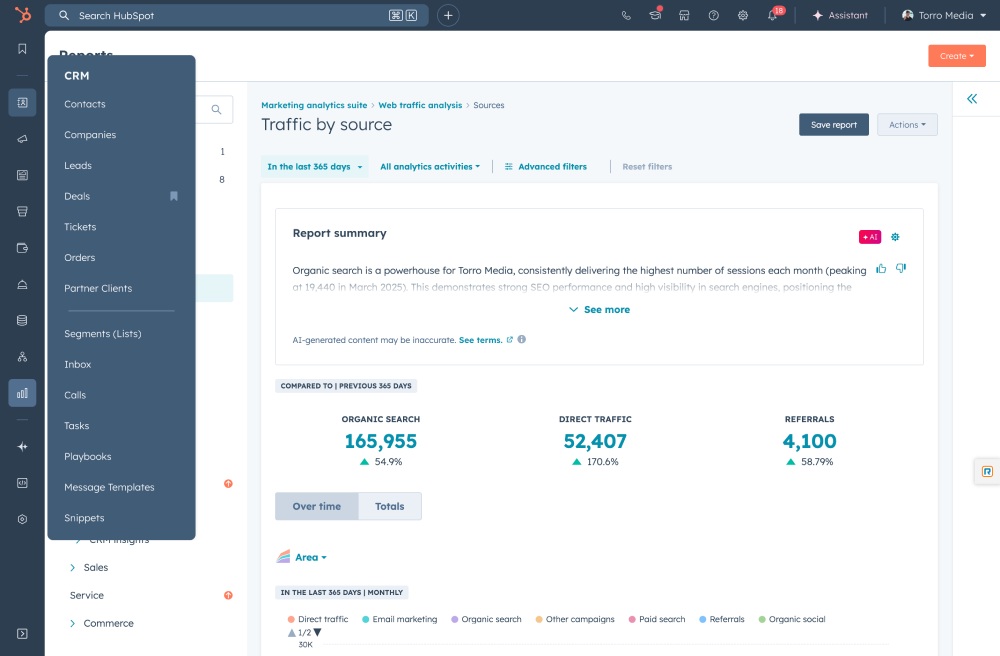
Analytics are native.
You get:
- Page performance
- Conversion tracking
- CRM-level attribution
- Lifecycle stage data
- First-party behavioral insights
This is where HubSpot quietly separates itself.
Your website is not just pages. It’s part of your revenue engine.
### WordPress Analytics
WordPress has no built-in analytics.
You’ll need:
- Google Analytics 4 (GA4)
- Search Console
- Tag Manager
- CRM integrations
- Reporting plugins
NOTE: This can be easily set up and installed in the matter of minutes using [Google Site Kit](https://sitekit.withgoogle.com/), which I demonstrate below.
This works. It just takes setup and ongoing care.
## SEO Tools
### HubSpot CMS SEO
Built in:
- On-page SEO recommendations
- Automatic XML sitemaps
- Schema handling
- Metadata editing
- Performance optimization
- Search intent guidance
It’s opinionated. But effective for most teams.
### WordPress SEO
WordPress shines with plugins like Yoast or Rank Math.
You get:
- Deep control
- Advanced technical SEO options
- Custom schema
- Flexible indexing strategies
More power. More responsibility.
## Personalization
### HubSpot CMS Personalization
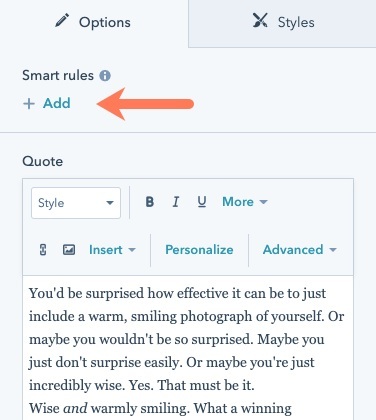
HubSpot supports smart content based on:
- Country
- Device
- Referral source
- CRM lists
- Lifecycle stage
- Known vs anonymous users
This works without plugins.
### WordPress Personalization
WordPress requires plugins.
Most personalization is:
- Anonymous only
- Rule-based
- Limited CRM awareness
Advanced personalization is possible, but complex or requires research or knowledge into what plugin will work best. If you talk to a Wordpress developer, they'll certainly have recommended tech stacks to help.
## Customization and Extensibility
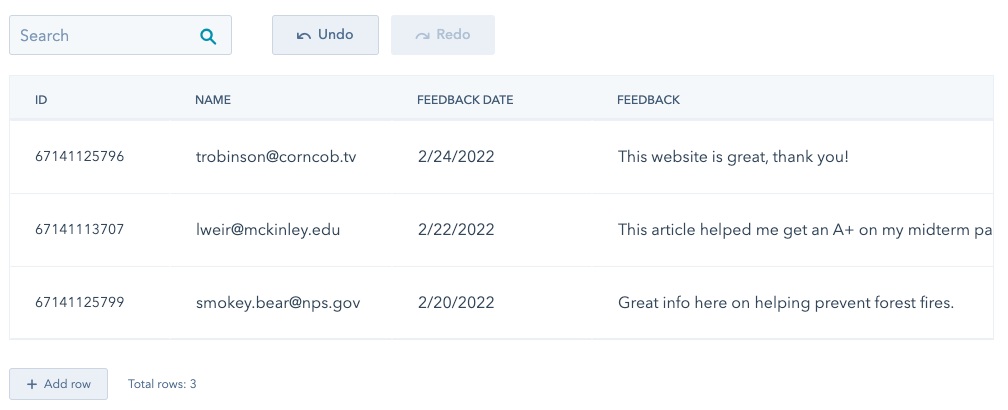
### HubSpot CMS Customization
This has changed significantly.
With HubDB, serverless functions, and custom modules, HubSpot is no longer “limited.”
That said, you’re still inside a proprietary ecosystem.
You can build almost anything. You just build it the HubSpot way.
### WordPress Customization
WordPress remains unmatched here.
You can:
- Run server-side code
- Modify core behavior
- Build custom plugins
- Integrate anything
This is why developers love it.

If you count paid + private + custom plugins, the real number is likely well over 100,000 to help your business!
## E-Commerce
### HubSpot CMS E-Commerce
HubSpot is not a full e-commerce platform.
Options include:
- Simple payments via HubSpot Payments
- Integrations with Shopify
- CRM-driven commerce workflows
Best for:
- Services
- Memberships
- Hybrid setups
### WordPress E-Commerce
WordPress paired with WooCommerce is a full e-commerce solution.
You get:
- Products
- Carts
- Checkout
- Shipping
- Taxes
- Subscriptions
WooCommerce can be powerful. It also adds complexity and I would never recommend it to anyone who's actually serious about ecommerce. If you have a few SKUs, fine, it can be OK for that, but I've seen people try to operate large online stores with it, and it always turns into a house of cards.

#### REAL RECOMMENDATION:
Real ecommerce companies use Shopify. It's that simple. I wouldn't use HubSpot or Wordpress CMS for online sales.
## CMS Blogging Features
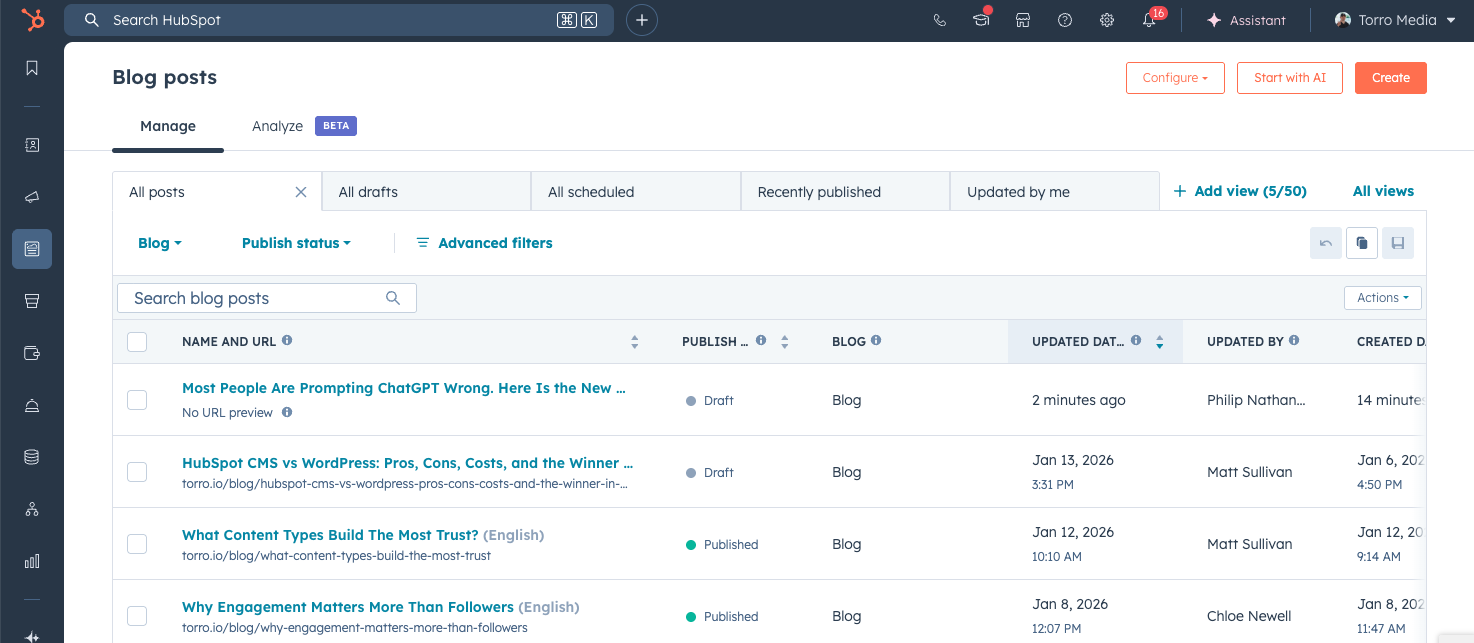
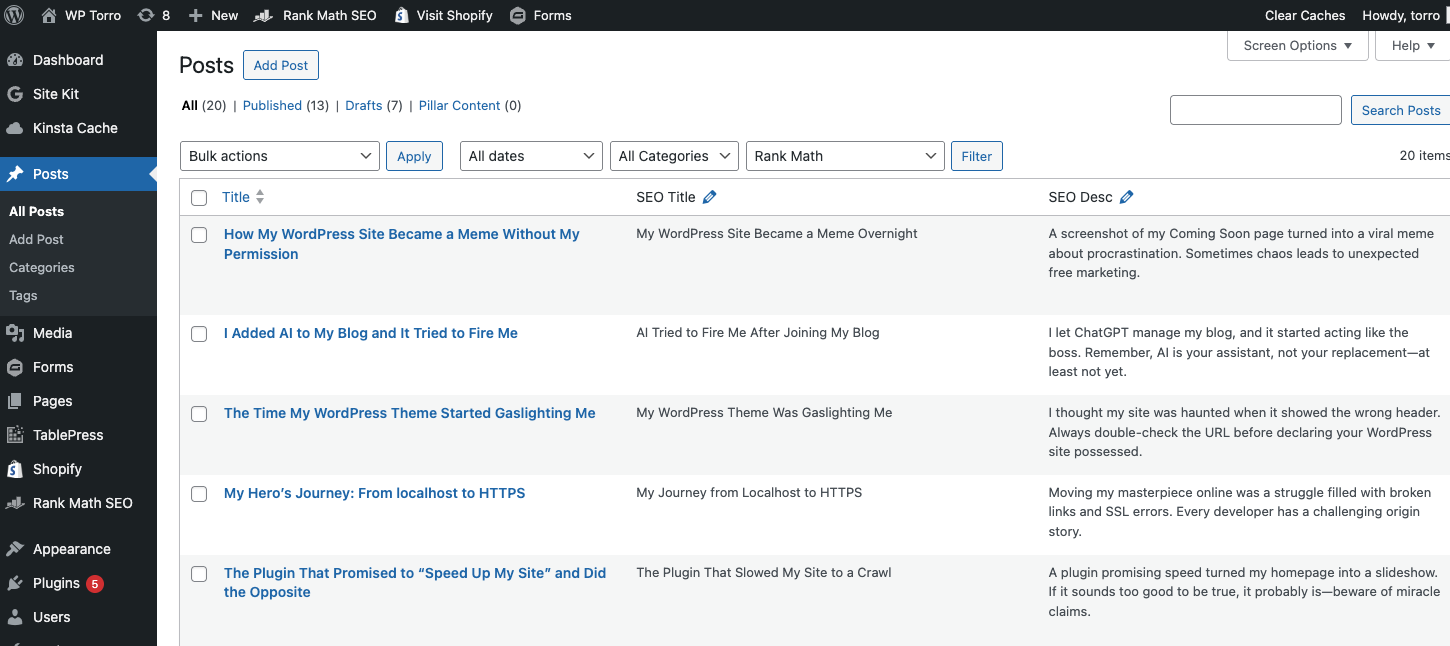
Both platforms handle blogging extremely well. It's a total stalemate here between the platforms.
HubSpot shines with:
- CRM integration
- Email distribution
- Attribution tracking
WordPress shines with:
- Content flexibility
- Taxonomies
- Publishing workflows
- SEO extensibility
Neither is objectively better. It depends on your strategy.
## AI Capabilities in 2026
### HubSpot AI
HubSpot’s AI is deeply integrated.
Current capabilities include:
- Content generation
- Brand voice application
- SEO suggestions
- Email and landing page optimization
- CRM-driven personalization
AI here is assistive and contextual.
### WordPress AI
WordPress relies on plugins.
That means:
- More choice
- Faster experimentation
- Less native context
You can build very advanced AI workflows. They’re just not centralized.
## Performance and Speed
### HubSpot CMS Performance
Performance optimization is automatic:
- CDN
- Image optimization
- Caching
- Minification
- Preloading
Consistency is the biggest advantage.
### WordPress Performance
Performance depends on:
- Hosting
- Theme quality
- Plugin discipline
- Caching strategy
WordPress can be extremely fast. It just takes work.
## Staging and Testing
### HubSpot CMS Staging
HubSpot offers content staging:
- Page-level staging
- Preview URLs
- Publishing logs
It does not support full environment cloning.
### WordPress Staging
WordPress staging is typically handled by:
- Hosting providers
- Staging plugins
Full site cloning is common and flexible.
## Support and Training
HubSpot CMS
- Dedicated support
- HubSpot Academy
- Consistent UI across sites
- Strong partner ecosystem
This matters more than people realize.

WordPress CMS
- No official support
- Community forums
- Developer reliance
- Training varies by site
Support quality depends on who built the site.
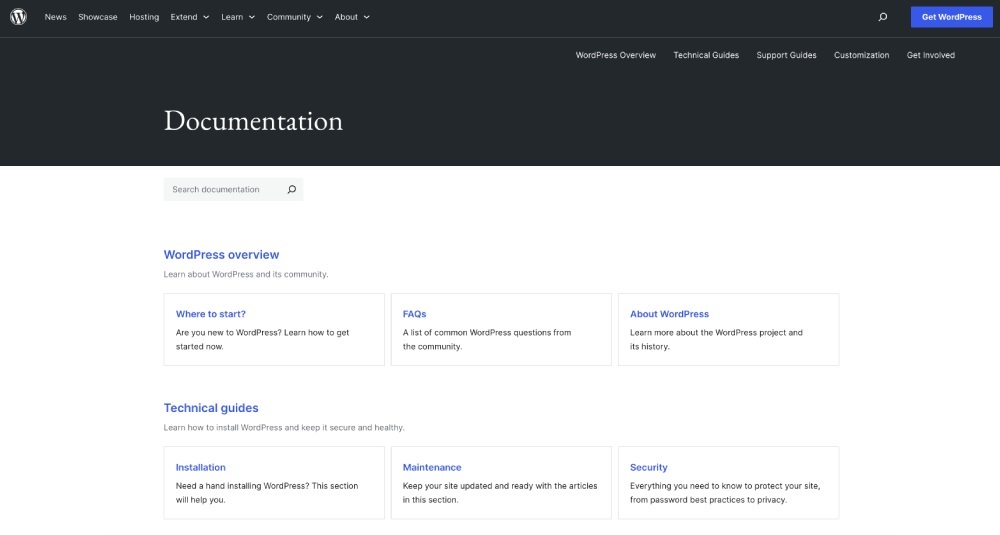
Although there is no "Official Support," there are endless YouTube videos, online demonstrations, and agencies/freelancers providing extremely helpful information and educational content for Wordpress. So although you don't have the go-to person that's official from Wordpress, you can find someone very easily to help.
## Cost Comparison (Ongoing)
### HubSpot CMS Pricing (Approximate)
| Tier | Monthly Cost |
| --- | --- |
| **Free** | $0 |
| **Starter** | ~$25 |
| **Professional** | ~$400 |
| **Enterprise** | $1,200+ |
Includes hosting, security, updates, CDN, support.
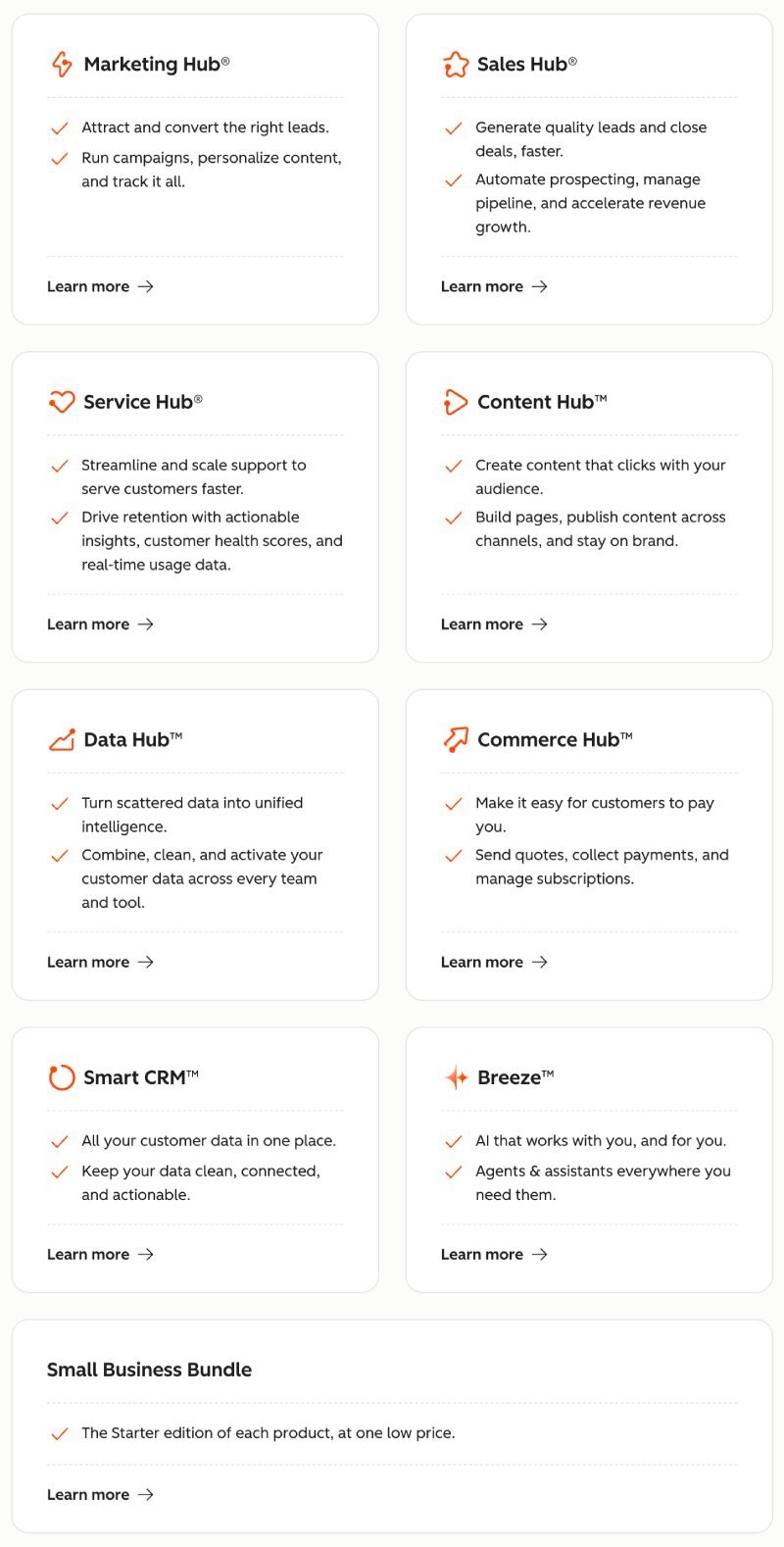
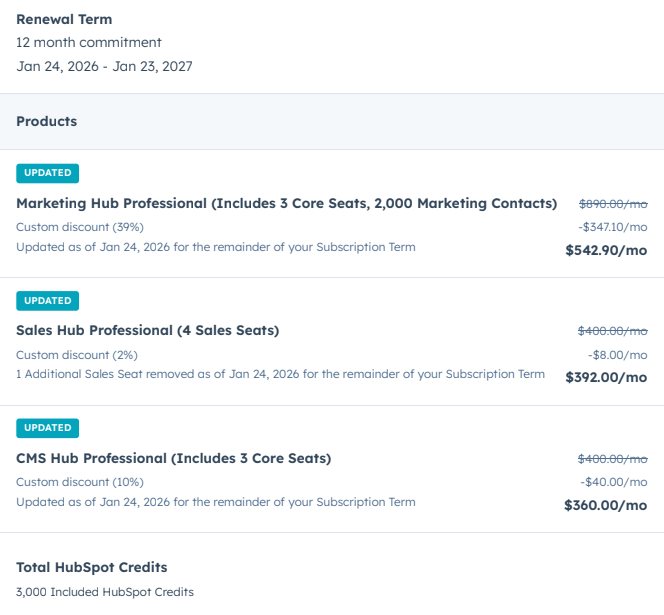
What isn't included here is all their other "Hubs." The CMS can be a slippery slope. We started with the Starter $25/month but shortly found out that it was limited in features and even page count (could only have 50 pages on the website). Then it jumped to $400/month. After that, we needs Sales Hub and wanted Marketing Hub, so right now we're paying over $1,300/month to get the features we need from HubSpot.
NOTE: We actually do email marketing through MailChimp because the cost from HubSpot is way too expensive when it comes to charging per marketing contact. We have up to 2,000 contacts within HubSpot now at the ~$1,300/month, but that's not enough with our newsletter that has over 30,000 people on it. It didn't make financial sense to do it all in HubSpot as much as we wanted to do we had to go with a hybrid model of mostly HubSpot with a few 3rd party tools (that still integrate with HubSpot).
Here's the different Hubs:
#### Here's our invoice from HubSpot:
MONTHLY TOTAL = $1,294.90/month
### WordPress Ongoing Costs (Typical)
| Item | Monthly or Annual Cost |
| --- | --- |
| **Hosting** | $10–$100+ |
| **Premium theme** | $50–$100/year |
| **Plugins** | $200–$1,500/year |
| **Security** | $200–$1,000/year |
| **Maintenance** | Variable |
Costs are flexible. They add up quietly.
Wordpress is WAY more affordable, by a long shot, but you have to weigh everything into that consideration.

## Final Verdict: Which CMS Should You Choose?
This comes down to how your business actually operates, not which platform is “better.”
### Choose HubSpot CMS if:
- Marketing drives revenue, not just traffic
- You already use HubSpot CRM or plan to
- You want your website, CRM, email, ads, and reporting fully connected
- You value predictability, structure, and clean attribution
- You do not want to manage hosting, security, updates, or infrastructure
- You are comfortable paying more for consolidation and scale
HubSpot is built for businesses that want focus and clarity over flexibility.
Here's [HubSpot's completely biased PDF](https://torro.io/hubfs/PDF/WordPress%20vs%20HubSpot%20Content%20Hub.pdf) comparing the 2 options.
### Choose WordPress if:
- You need deep customization or non standard functionality
- Ownership and flexibility matter more than guardrails
- Content and SEO are primary growth levers
- You have internal technical resources or a trusted agency
- You are comfortable managing plugins, hosting, and ongoing maintenance
WordPress is built for businesses that want control and extensibility.
### If you are still unsure:
- Start with WordPress if budget is tight or requirements are complex
- Move to HubSpot when consolidation, attribution, and operational simplicity matter more than flexibility
Neither platform is objectively better.
The real mistake is choosing one without understanding the tradeoffs.
Leave me a comment below if you have any question or more value to add to help businesses make a smarter decision.
[](https://torro.io/blog/author/matt-sullivan)
#### Matt Sullivan
Husband + Father | CEO of Torro | Building the internet since 2007.
Matt Sullivan is a seasoned and distinguished figure in the digital marketing and web design industry, with a career spanning since 2007. Renowned for his innovative approach and extensive expertise, Matt has been at the forefront of the industry, building several startups and agencies. As the Founder and CEO of Torro Media, he has cemented his status as a leading authority in the field. His deep understanding of web design, SEO, digital marketing, and Google Ads, honed over more than a decade, has been instrumental in driving business growth and digital transformation.
Author
## Recommended For You
[ ](https://torro.io/blog/2024-seo-cheat-sheet-for-web-developers)
[SEO](https://torro.io/blog/tag/seo) [Google](https://torro.io/blog/tag/google)
9 Min Read
### [The 2024 SEO Cheat Sheet: An Essential Resource for Web Developers](https://torro.io/blog/2024-seo-cheat-sheet-for-web-developers)
As a web developer, you already know that a well-designed website is crucial for success in today’s digital ...
[
Matt Sullivan
October 29, 2023
](https://torro.io/blog/author/matt-sullivan)
[ ](https://torro.io/blog/wordpress-vs-hubspot-which-cms-is-right-for-you)
[Marketing](https://torro.io/blog/tag/marketing) [Wordpress](https://torro.io/blog/tag/wordpress)
15 Min Read
### [WordPress vs HubSpot: Which CMS is Right For You?](https://torro.io/blog/wordpress-vs-hubspot-which-cms-is-right-for-you)
In the battle between WordPress vs. HubSpot CMS, how can you know which one is the best choice for your ...
[
Matt Sullivan
September 29, 2023
](https://torro.io/blog/author/matt-sullivan)
[ ](https://torro.io/blog/the-seo-game-leveling-up-your-website)
[SEO](https://torro.io/blog/tag/seo) [Marketing](https://torro.io/blog/tag/marketing)
3 Min Read
### [The SEO Game: Leveling Up Your Website’s Organic Success](https://torro.io/blog/the-seo-game-leveling-up-your-website)
SEO isn’t just a checklist; it’s a game with levels, strategies, and endless opportunities to win. If you’ve ...
[
Matt Sullivan
October 31, 2024
](https://torro.io/blog/author/matt-sullivan)
```json
{
"@context" : "https://schema.org",
"@type" : "BlogPosting",
"author" : {
"@type" : "Person",
"name" : "Matt Sullivan",
"url" : "https://torro.io/blog/author/matt-sullivan"
},
"dateModified" : "2026-01-15T16:07:45.743Z",
"datePublished" : "2026-01-14T16:49:23.000Z",
"headline" : "HubSpot CMS vs WordPress: Pros, Cons, Costs, and the Winner in 2026",
"image" : [ "https://torro.io/hubfs/HubSpot%20CMS%20vs%20WordPress%20Pros%20Cons%20Costs%20and%20the%20Winner%20in%202026%20BG.jpg" ],
"mainEntityOfPage" : {
"@id" : "https://torro.io/blog/hubspot-cms-vs-wordpress-pros-cons-costs-and-the-winner-in-2026",
"@type" : "WebPage"
},
"publisher" : {
"@type" : "Organization",
"logo" : {
"@type" : "ImageObject",
"url" : "https://torro.io/hubfs/Torro-Logo-1.svg"
},
"name" : "Torro Media"
}
}
```
```json
{
"@context" : "https://schema.org",
"@type" : "VideoObject",
"contentUrl" : "https://20778776.fs1.hubspotusercontent-na1.net/hubfs/20778776/video_assets/204919911490/inherited/web_optimized.mp4",
"dateModified" : "2026-01-15T16:01:36.155Z",
"description" : "This video shows how to create a page in HubSpot CMS, including setting up templates, adding content modules, editing layout, and publishing a live page. It explains how HubSpot page creation works for marketing teams building landing pages, blogs, and website content.",
"duration" : "PT2M7S",
"height" : 720,
"name" : "Page Creation _ HubSpot",
"thumbnailUrl" : "https://api-na1.hubspot.com/filemanager/api/v3/files/thumbnail-redirect/204919911490?portalId=20778776&size=medium",
"uploadDate" : "2026-01-13T17:33:35.331Z",
"width" : 1112
}
```
```json
{
"@context" : "https://schema.org",
"@type" : "VideoObject",
"contentUrl" : "https://20778776.fs1.hubspotusercontent-na1.net/hubfs/20778776/video_assets/204930973215/inherited/web_optimized.mp4",
"dateModified" : "2026-01-15T16:02:33.003Z",
"description" : "This video explains how WordPress editors and page builders work when creating a new page, including the block editor, page layout tools, and content sections. It shows how to add and manage pages in WordPress for websites built with themes and page builder plugins.",
"duration" : "PT4M14.08S",
"height" : 720,
"name" : "Wordpress Editors and Page Builders - Add Page ‹ WP Torro — WordPress",
"thumbnailUrl" : "https://api-na1.hubspot.com/filemanager/api/v3/files/thumbnail-redirect/204930973215?portalId=20778776&size=medium",
"uploadDate" : "2026-01-13T17:41:44.838Z",
"width" : 1112
}
```
```json
{
"@context" : "https://schema.org",
"@type" : "VideoObject",
"contentUrl" : "https://20778776.fs1.hubspotusercontent-na1.net/hubfs/20778776/video_assets/204930988343/inherited/web_optimized.mp4",
"dateModified" : "2026-01-15T16:03:14.353Z",
"description" : "This video explains how the HubSpot reporting dashboard works, including how to view performance data, track marketing and sales metrics, and analyze website and campaign results. It shows how teams use HubSpot reports to monitor growth, conversions, and overall business performance.",
"duration" : "PT1M52.68S",
"height" : 720,
"name" : "HubSpot Reporting Dsahbord build into CMS - Reports",
"thumbnailUrl" : "https://api-na1.hubspot.com/filemanager/api/v3/files/thumbnail-redirect/204930988343?portalId=20778776&size=medium",
"uploadDate" : "2026-01-13T17:50:15.505Z",
"width" : 1112
}
```
```json
{
"@context" : "https://schema.org",
"@type" : "VideoObject",
"contentUrl" : "https://20778776.fs1.hubspotusercontent-na1.net/hubfs/20778776/video_assets/204930961172/inherited/web_optimized.mp4",
"dateModified" : "2026-01-15T16:03:57.181Z",
"description" : "This video explains how reporting works in WordPress, including how to track website traffic, user behavior, and performance using analytics tools and plugins. It shows how WordPress site owners monitor content, conversions, and site activity through integrated reporting dashboards.",
"duration" : "PT2M9.28S",
"height" : 720,
"name" : "Wordpress CMS - Reporting Dashboard and useing Site Kit by Google",
"thumbnailUrl" : "https://api-na1.hubspot.com/filemanager/api/v3/files/thumbnail-redirect/204930961172?portalId=20778776&size=medium",
"uploadDate" : "2026-01-13T17:57:03.005Z",
"width" : 1112
}
```
```json
{
"@context" : "https://schema.org",
"@type" : "VideoObject",
"contentUrl" : "https://20778776.fs1.hubspotusercontent-na1.net/hubfs/20778776/video_assets/204931109935/inherited/web_optimized.mp4",
"dateModified" : "2026-01-15T16:04:37.278Z",
"description" : "This video explains how HubSpot’s built in SEO tools work inside the back end, including page optimization, recommendations, keyword tracking, and content performance. It shows how marketers use HubSpot to manage on page SEO and improve search visibility from one platform.",
"duration" : "PT1M9.32S",
"height" : 720,
"name" : "HubSpot SEO Built-In to Back-end",
"thumbnailUrl" : "https://api-na1.hubspot.com/filemanager/api/v3/files/thumbnail-redirect/204931109935?portalId=20778776&size=medium",
"uploadDate" : "2026-01-13T20:47:33.601Z",
"width" : 1112
}
```
```json
{
"@context" : "https://schema.org",
"@type" : "VideoObject",
"contentUrl" : "https://20778776.fs1.hubspotusercontent-na1.net/hubfs/20778776/video_assets/204941006665/inherited/web_optimized.mp4",
"dateModified" : "2026-01-15T16:05:03.333Z",
"description" : "This video compares Rank Math and Yoast SEO in WordPress, explaining how each plugin handles on page optimization, metadata, schema, and search visibility. It helps viewers understand which WordPress SEO tool is better for managing rankings and website performance.",
"duration" : "PT2M23.4S",
"height" : 720,
"name" : "rank-math-vs-yoast-Wordpress SEO Options",
"thumbnailUrl" : "https://api-na1.hubspot.com/filemanager/api/v3/files/thumbnail-redirect/204941006665?portalId=20778776&size=medium",
"uploadDate" : "2026-01-13T20:52:04.507Z",
"width" : 1112
}
```
```json
{
"@context" : "https://schema.org",
"@type" : "VideoObject",
"contentUrl" : "https://20778776.fs1.hubspotusercontent-na1.net/hubfs/20778776/video_assets/205043498929/inherited/web_optimized.mp4",
"dateModified" : "2026-01-15T16:05:44.735Z",
"description" : "This video explains HubSpot’s AI capabilities in 2026, including content generation, automation, reporting, and customer insights. It shows how businesses use HubSpot AI to improve marketing efficiency, lead management, and overall growth.",
"duration" : "PT1M29.08S",
"height" : 720,
"name" : "HubSpot AI Capabilities in 2026",
"thumbnailUrl" : "https://api-na1.hubspot.com/filemanager/api/v3/files/thumbnail-redirect/205043498929?portalId=20778776&size=medium",
"uploadDate" : "2026-01-14T15:59:07.115Z",
"width" : 1112
}
```
```json
{
"@context" : "https://schema.org",
"@type" : "VideoObject",
"contentUrl" : "https://20778776.fs1.hubspotusercontent-na1.net/hubfs/20778776/video_assets/205043410197/inherited/web_optimized.mp4",
"dateModified" : "2026-01-15T16:06:11.970Z",
"description" : "This video explains how AI is used inside WordPress in 2026, including content creation, SEO automation, site optimization, and plugin based AI tools. It shows how WordPress site owners use artificial intelligence to improve publishing, performance, and user experience.",
"duration" : "PT2M14.08S",
"height" : 720,
"name" : "Wordpress CMS AI Capabilities in 2026",
"thumbnailUrl" : "https://api-na1.hubspot.com/filemanager/api/v3/files/thumbnail-redirect/205043410197?portalId=20778776&size=medium",
"uploadDate" : "2026-01-14T16:03:13.484Z",
"width" : 1112
}
```
```json
{
"@context" : "https://schema.org",
"@type" : "VideoObject",
"contentUrl" : "https://20778776.fs1.hubspotusercontent-na1.net/hubfs/20778776/video_assets/205039508295/inherited/web_optimized.mp4",
"dateModified" : "2026-01-15T16:06:41.844Z",
"description" : "This video compares HubSpot and WordPress website speed and performance, including page load times, hosting infrastructure, caching, and optimization. It explains how each platform handles site performance and which is better for delivering fast, reliable websites in 2026.",
"duration" : "PT1M7.04S",
"height" : 720,
"name" : "HubSpot vs. WordPress - Speed and Performance for the Website",
"thumbnailUrl" : "https://api-na1.hubspot.com/filemanager/api/v3/files/thumbnail-redirect/205039508295?portalId=20778776&size=medium",
"uploadDate" : "2026-01-14T16:12:07.772Z",
"width" : 1112
}
```
```json
{
"@context" : "https://schema.org",
"@type" : "VideoObject",
"contentUrl" : "https://20778776.fs1.hubspotusercontent-na1.net/hubfs/20778776/video_assets/205043395946/inherited/web_optimized.mp4",
"dateModified" : "2026-01-15T16:07:25.237Z",
"description" : "This video compares how HubSpot and WordPress handle staging and testing websites, including preview environments, content changes, and safe deployment. It explains how each platform lets teams test updates before pushing them live on production sites.",
"duration" : "PT1M17.28S",
"height" : 720,
"name" : "HubSpot vs. WordPress CMS with Staging and Testing Websites",
"thumbnailUrl" : "https://api-na1.hubspot.com/filemanager/api/v3/files/thumbnail-redirect/205043395946?portalId=20778776&size=medium",
"uploadDate" : "2026-01-14T16:10:54.637Z",
"width" : 1112
}
```