
LinkedIn just introduced collaborative posts, and I think this is one of the more important updates businesses should be paying attention to. The concept isn't new. Instagram made collaboration posts popular, and YouTube eventually introduced its own version. But bringing this functionality to LinkedIn opens up some interesting opportunities, especially for companies trying to grow their professional audiences, strengthen their brand authority, and improve visibility in AI-powered search.

Collab sample between Torro an Matt Sullivan
TL;DR: What You Need to Know About LinkedIn Collaborative Posts
- LinkedIn launched collaborative posts on July 23, 2026, allowing members and company pages to publish content together.
- You can invite up to five collaborators to appear alongside the original author.
- Collaborators must accept an invitation. Once accepted, the post appears on their profile or company page.
- The feature supports most major post formats, including text, images, videos, documents, links, polls, and events.
- Businesses can use collaboration posts to connect company pages with founders, employees, clients, and partners.
- LinkedIn is already an important source for AI search. Research published by Semrush in 2026 found LinkedIn appearing in approximately 11% of AI responses across the tools studied.
- Collaboration does not guarantee additional reach or AI citations, but it creates another way to distribute useful content through relevant professional networks.
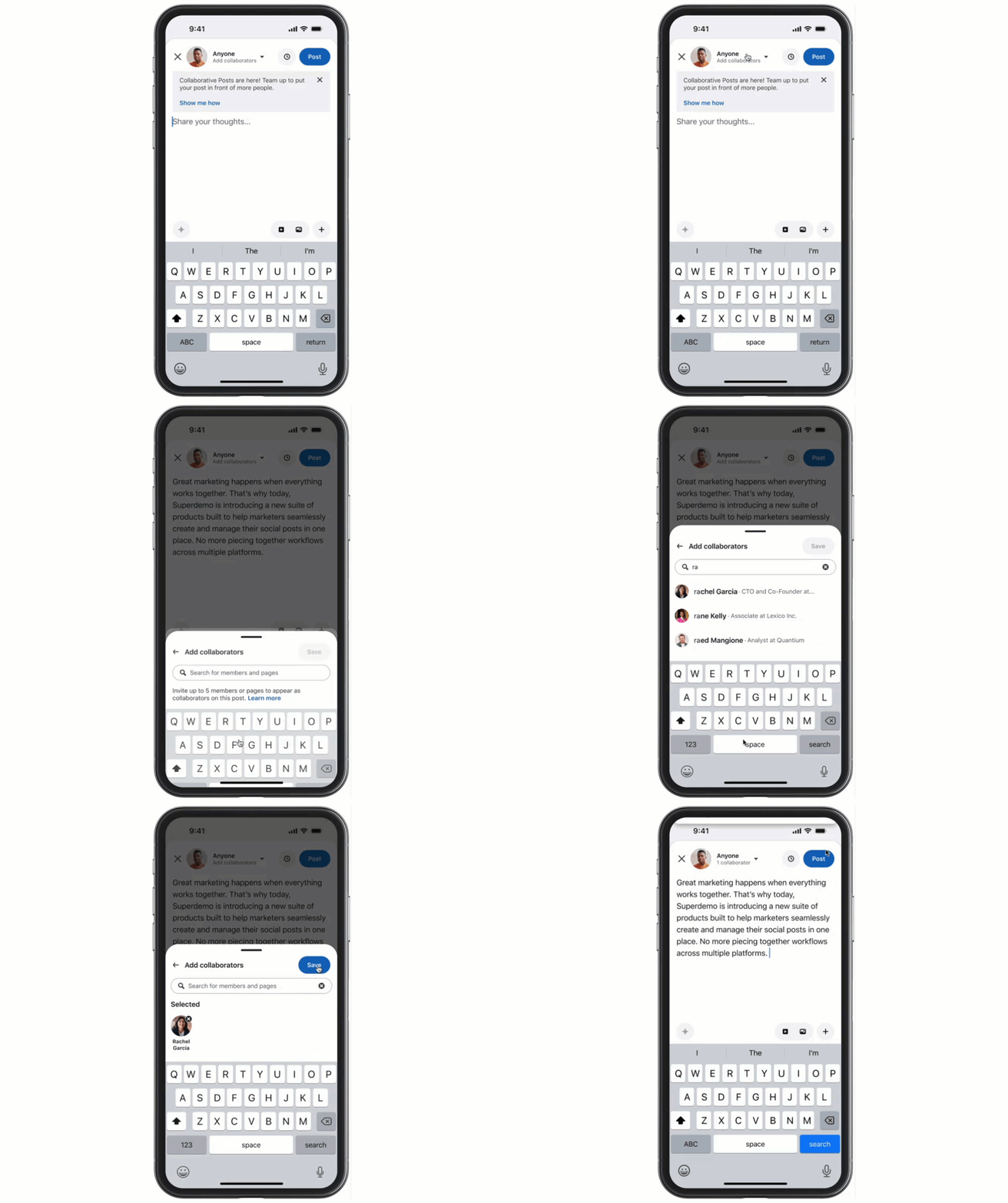
What Are LinkedIn Collaborative Posts?
LinkedIn collaborative posts are public posts that allow multiple LinkedIn members or company pages to appear as collaborators on the same piece of content.
Instead of one person publishing a post and tagging everyone involved, the original author can invite up to five other members or company pages to participate. When someone accepts, LinkedIn displays them as a collaborator and associates the post with their profile or page.
That distinction matters.
Tagging someone mentions them in your content. A collaboration formally connects them to the post.
LinkedIn officially announced the feature on July 23, 2026, confirming support for members and company pages.
The rollout is gradual, so some users may not have access yet.
How to Create a Collaborative Post on LinkedIn
I tested the feature using my personal LinkedIn profile and our company page for Torro Media. The process was straightforward. Adding a collaborator took only a few clicks, and the invitation was easy to accept.
Here's how to create a LinkedIn collaboration post from your personal profile.
Step 1: Start a New LinkedIn Post
Open LinkedIn and click Start a post from your homepage.
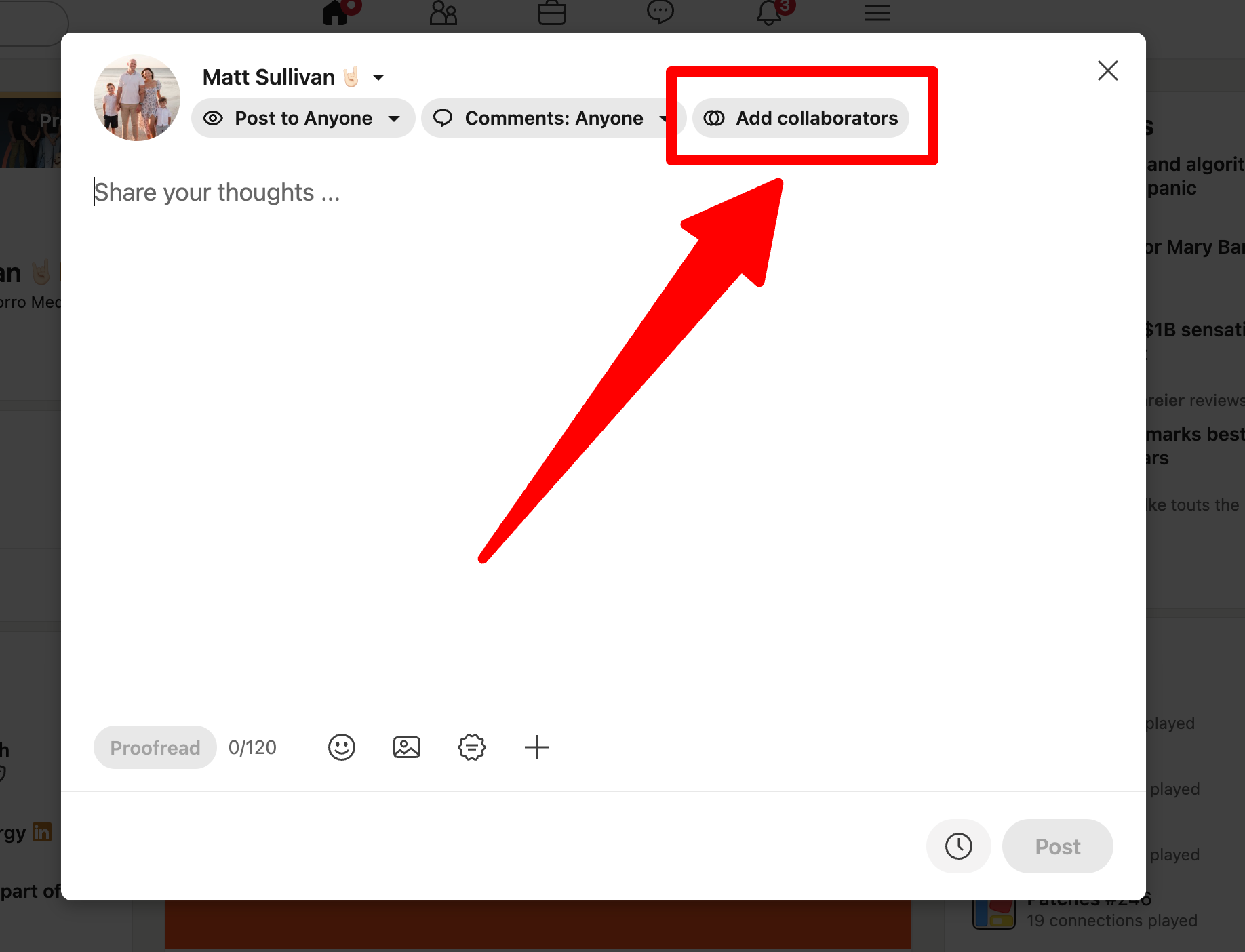
At the top of the post editor, you'll see the audience settings, comment settings, and a new option labeled Add collaborators if the feature is available on your account.

Step 2: Add Your Collaborators
Click Add collaborators to open the collaborator search window.
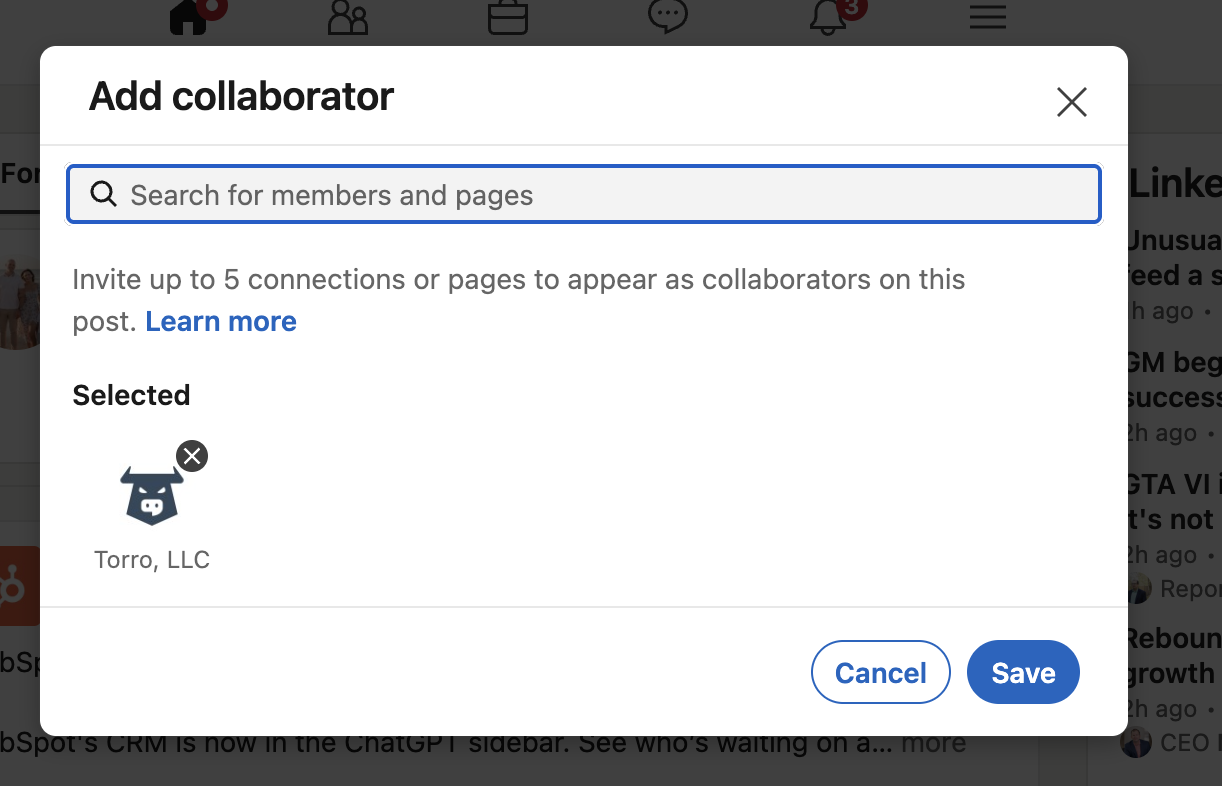
Search for the LinkedIn members or company pages you want to include. You can invite up to five collaborators.
For example, a business owner could invite their company page, a business partner, and several employees who contributed to the content.
Step 3: Save Your Collaborators and Publish
Once you've selected your collaborators, click Save.
Finish writing your post, attach your image, video, or document if needed, and publish it.
LinkedIn sends invitations to the selected collaborators. They can accept or decline.
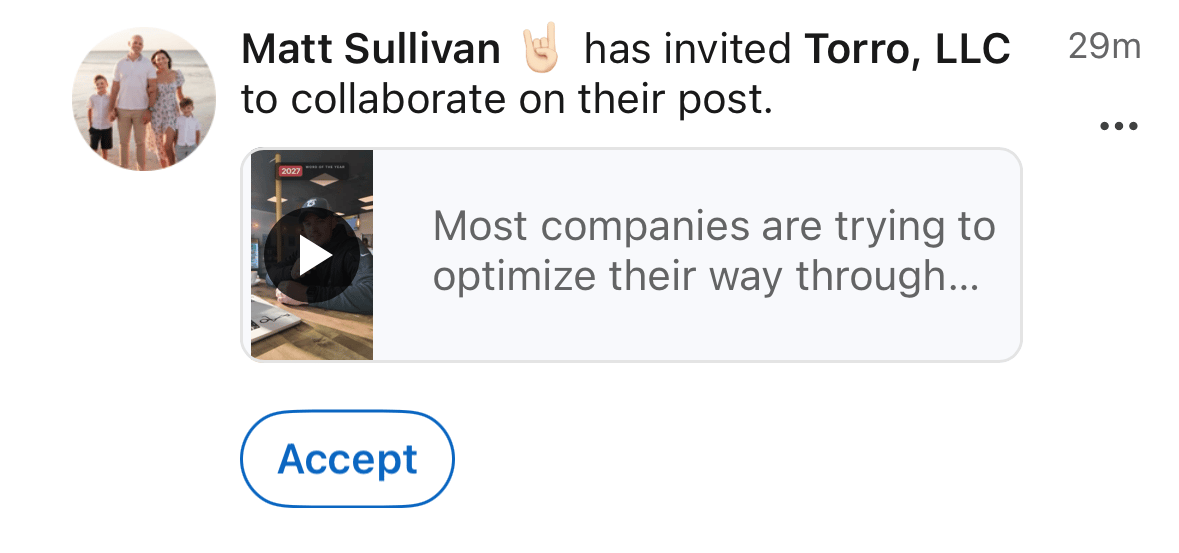
Step 4: Have Your Collaborators Accept the Invitation
Each invited collaborator receives a notification, subject to their notification settings.
Once they accept, LinkedIn adds them to the post and displays the content on their profile or company page.
If they decline, the original post remains published without their collaboration.
Step 5: Confirm That the Collaboration Is Live
After the invitation is accepted, check the published post.
You should see the collaborator's name displayed alongside the original author.
In my test, I published from my personal LinkedIn profile and added Torro, LLC as the collaborator. Once the invitation was accepted, the post displayed both my name and Torro's company page.
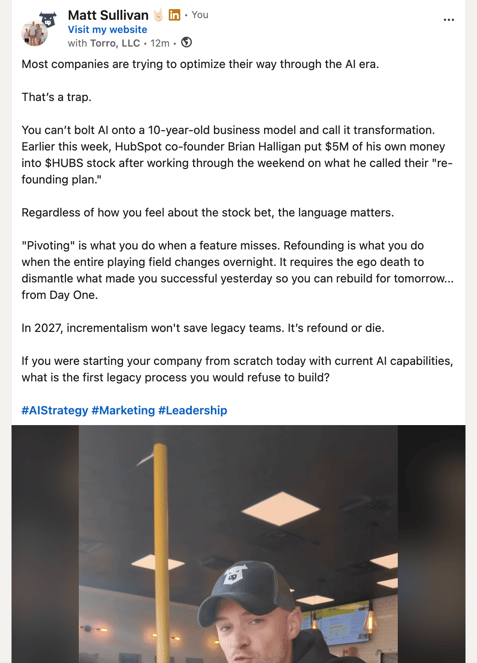
That's the part that caught my attention.
You can connect the voice of an individual with the identity of a business without creating two separate posts.
Why LinkedIn Collaboration Posts Matter for Businesses
Most companies have spent years trying to grow their LinkedIn company pages.
They publish updates, share blog articles, promote employees, and hope their followers engage.
Meanwhile, many founders and employees have built professional networks of their own.
Those networks don't always overlap.
Collaborative posts create a direct connection between them.
1. Connect Personal Profiles With Company Pages
A company page and its founder don't necessarily reach the same people.
Someone might follow the founder because they appreciate their perspective but never think to follow the business.
Another person might follow the company without knowing much about its leadership.
Collaborative posts give both audiences a clearer connection to the same content.
This is particularly interesting when you consider the difference between personal and company page performance.
Metricool's 2026 LinkedIn research, which analyzed 673,658 posts from 63,108 accounts, reported 63% higher engagement on personal profiles than company pages.
That doesn't mean every personal post will outperform a company post. But it helps explain why businesses should consider the people behind their brands when planning content distribution.
2. Give Clients and Partners More Visibility
Think about how many companies announce partnerships, completed projects, customer success stories, or joint events on LinkedIn.
Traditionally, one company publishes the announcement and tags the other.
Now, both organizations can appear on the same post.
For an agency like Torro Media, this creates an opportunity to publish a client success story and invite the client to collaborate.
The agency gets to explain the work. The client gets to share the result. Both organizations are connected to the same story.
And the content has a chance to reach people who might not follow both businesses.
3. Support Employee Advocacy Without Duplicate Posts
Employee advocacy is the practice of employees sharing content that supports their company's expertise, culture, or reputation.
LinkedIn collaborative posts give businesses another way to involve employees in that process.
Instead of asking five employees to copy and paste the same company announcement, a business can invite relevant team members to collaborate on one post.
This works particularly well when those employees contributed to the project or have something meaningful to add to the conversation.
I wouldn't recommend adding employees to every company post just because the feature exists.
The collaboration should make sense.
LinkedIn Collaborative Posts vs. Instagram and YouTube Collaborations
Instagram helped make collaborative publishing familiar to social media users. YouTube later introduced collaboration functionality for creators.
LinkedIn is applying the same general concept to professional content.
The biggest difference is how businesses can use it.
| Platform | Collaboration Focus | Business Opportunity |
|---|---|---|
| Shared social content between accounts | Creators, brands, partnerships, and audience discovery | |
| YouTube | Creator collaborations on videos | Audience discovery and creator partnerships |
| Joint posts between professional profiles and company pages | B2B relationships, thought leadership, employee advocacy, and brand visibility |
I've used collaboration tools on other platforms, and LinkedIn's implementation felt especially easy during my initial test.
The invitation process was simple, and the collaborator could accept without much effort.
That's important because the easier it is to participate, the more practical the feature becomes for everyday business content.
Why LinkedIn Collaborative Posts Could Matter for AI Visibility
This is where I think the conversation gets more interesting.
LinkedIn isn't just a place to network or look for jobs anymore.
It's also a source of professional information that AI search tools can retrieve, reference, and cite.
Businesses are increasingly paying attention to whether they appear in answers from ChatGPT, Google AI Overviews, Perplexity, Gemini, and other AI-powered tools.
And LinkedIn is part of that conversation.
LinkedIn Is Already a Significant Source for AI Search
In research published in June 2026, Semrush analyzed 89,000 unique LinkedIn URLs cited by ChatGPT Search, Google AI Mode, and Perplexity.
The research found that LinkedIn appeared in approximately 11% of AI responses on average across the tools studied.
You can read the findings in Semrush's analysis of LinkedIn content and AI search visibility.
That's a meaningful finding for companies investing in content marketing.
It suggests that useful LinkedIn content can be discovered and cited outside LinkedIn itself.
But there's an important distinction: an AI tool citing a public LinkedIn post is not the same thing as that post being used to train the underlying language model.
Training data, search retrieval, and citations are different processes. Businesses should focus on measurable AI search visibility rather than assuming every LinkedIn post becomes part of an AI model's training data.
How Could Collaboration Improve AI Visibility?
Collaborative posts create an opportunity to associate useful content with multiple relevant professional identities.
Imagine a cybersecurity company publishing a detailed explanation of a new security threat.
The company invites its chief technology officer and an industry partner to collaborate.
The post now connects the topic with the company, a named expert, and another relevant organization.
That could help more professionals discover and engage with the content.
Greater exposure could also lead to more references, discussions, and links elsewhere on the web.
Those are potential benefits, not guaranteed outcomes.
There is currently no established evidence that simply adding collaborators causes LinkedIn content to receive more AI citations or higher Google rankings.
What we do know is that LinkedIn content is already being cited by AI search tools, and collaboration gives businesses another way to distribute that content.
That's enough reason to test it.
Content Quality Still Matters More Than the Number of Collaborators
Adding five collaborators to a weak post won't automatically make it valuable.
If you want content to perform well on LinkedIn and potentially appear in AI-generated answers, focus on answering real questions.
Explain what something is. Show how it works. Include examples, original research, and relevant data when available.
The same Semrush research found that approximately three-quarters of the authors whose LinkedIn content received AI citations had published at least five posts during the previous four weeks.
The researchers also highlighted an example of a LinkedIn post that received 45 ChatGPT citations despite having only 31 likes and 12 comments.
The lesson is simple.
A post doesn't need to go viral to be useful to an AI search engine.
Clear, specific, expert-led content can have value beyond the engagement numbers visible on LinkedIn.
7 Ways Businesses Can Use LinkedIn Collaborative Posts
The best collaboration opportunities are the ones where multiple people or organizations genuinely contributed to the story.
Here are seven examples worth testing.
1. Founder and Company Announcements
Publish a business update from the founder's profile and invite the company page to collaborate. This connects the founder's professional network with the business.
2. Client Success Stories
Share a completed project, case study, or measurable result and invite the client to participate, with their approval.
3. Employee Recognition
Celebrate an employee's achievement with a post that includes both the company and the person being recognized.
4. Podcast Interviews
Publish a clip or takeaway from a podcast and invite the guest or host to collaborate.
5. Events and Conferences
Connect event organizers, speakers, sponsors, and participating companies through relevant event content.
6. Industry Research and Educational Content
Publish original research or an educational post with the experts who helped develop it. This is particularly useful when the content answers common customer questions.
7. Business Partnerships and Product Launches
Announce a joint initiative with the organizations involved instead of publishing separate announcements from each account.
LinkedIn Collaboration Rules and Limitations
Before you start inviting collaborators to every post, there are a few things you should know.
- Five collaborators maximum: LinkedIn allows up to five invited collaborators per post.
- Public posts only: Collaborative posts must be public.
- Acceptance required: Invited collaborators must accept before appearing on the post.
- Gradual availability: The feature may not be available to every account yet.
- Creator controls: Only the original author can edit the post and manage its collaborators.
- Collaborators can leave: An accepted collaborator can remove themselves from a post.
- Company page permissions: A page administrator must accept collaboration invitations on behalf of a company page.
LinkedIn also allows the original author to add or remove collaborators after publishing.
That's useful if you forget someone or need to adjust a collaboration after the post goes live.
One limitation worth mentioning involves analytics. LinkedIn states that page administrators can see performance through Page analytics, but engagement metrics are not available to Pages added as collaborators in the same way they are for individual members.
You can review the current requirements in LinkedIn's collaboration documentation.
How to Measure Whether LinkedIn Collaborative Posts Actually Work
I wouldn't judge this feature based on one post.
If you're responsible for a company's LinkedIn strategy, test collaborative posts against similar content published without collaborators.
Start with a simple experiment.
- Establish a baseline. Review recent posts and record their impressions, engagement, and audience reach.
- Choose relevant collaborators. Start with a founder, employee, client, or partner who has a genuine connection to the content.
- Publish several collaborative posts. Test different topics and formats rather than relying on a single result.
- Compare similar posts. Look at impressions, engagement rates, and out-of-network reach when those metrics are available.
- Track business outcomes. Monitor website visits, qualified inquiries, profile visits, and other relevant conversions.
- Monitor AI visibility separately. Check whether your company and its content appear in relevant AI-generated answers over time.
Be careful when interpreting the results. A collaboration with a well-known industry expert may outperform another post because of the topic, the expert's audience, or the quality of the content.
That doesn't mean the collaboration feature alone caused the difference.
LinkedIn's own post analytics documentation explains how to measure impressions, members reached, and in-network versus out-of-network visibility.
For AI visibility, the measurements are different.
Look for citations, brand mentions, and recommendations across relevant AI search queries. Those results may take longer to develop and should not be confused with LinkedIn engagement.
Frequently Asked Questions About LinkedIn Collaborative Posts
Can you add collaborators to a LinkedIn post?
Yes. LinkedIn allows eligible members and company pages to invite up to five collaborators to a public post. Invited collaborators must accept before appearing alongside the original author.
How do you add a collaborator on LinkedIn?
Start a new LinkedIn post, select Add collaborators, search for the members or company pages you want to include, click Save, and publish. LinkedIn then sends invitations for collaborators to accept or decline.
Can a LinkedIn company page collaborate with a personal profile?
Yes. LinkedIn supports collaborative posts between personal profiles and company pages. A page administrator must accept an invitation on behalf of the company page.
How many collaborators can you have on LinkedIn?
LinkedIn allows up to five invited collaborators on a single collaborative post, in addition to the original author.
Can you add collaborators after publishing a LinkedIn post?
Yes. The original author can edit a published collaborative post to add or remove collaborators. New collaborators receive an invitation to accept or decline.
Do LinkedIn collaboration posts get more views?
LinkedIn collaboration posts can expand visibility by associating content with multiple members or company pages. However, LinkedIn does not guarantee additional impressions, and there is not yet enough established evidence to assign a reliable average reach increase to the feature.
Do LinkedIn collaborative posts help SEO?
LinkedIn collaborative posts may support a broader SEO strategy by helping useful content reach relevant audiences and potentially earn additional attention or links. They do not directly guarantee better Google rankings.
Can LinkedIn posts appear in ChatGPT or other AI search results?
Yes. Public LinkedIn content can be cited by AI search tools. Semrush research published in 2026 analyzed 89,000 LinkedIn URLs cited by ChatGPT Search, Google AI Mode, and Perplexity. However, a LinkedIn collaboration does not guarantee that AI systems will retrieve or cite the post.
Why can't I see the Add collaborators button on LinkedIn?
LinkedIn is rolling out the feature gradually. If the Add collaborators option isn't visible, your account may not have access yet. Availability can also depend on account eligibility and collaboration settings.
My Take: Businesses Should Start Testing LinkedIn Collaborative Posts Now
I think this feature has real potential, especially for B2B companies.
LinkedIn has always been about professional relationships. Collaborative posts give businesses a more direct way to connect those relationships to the content they're publishing.
A founder can collaborate with their company. An agency can collaborate with a client. An employee can collaborate with their employer. Two companies can share an announcement without each creating a separate version.
And as LinkedIn becomes an increasingly relevant source for AI-powered search, businesses have another reason to take their content seriously.
I'm not suggesting that adding collaborators is some secret trick to get recommended by ChatGPT.
It isn't.
But I do think companies should be looking for every legitimate opportunity to make their expertise more visible, connect it with credible people, and distribute it to the audiences that matter.
LinkedIn collaborative posts make that easier.
I tested the feature with Torro, and the process was simple. Now I'm interested in seeing how it performs over time.
If your company is active on LinkedIn, I'd recommend trying it with your next relevant announcement, case study, or educational post.
Start with one good collaboration. Measure what happens. Then build from there.
Want to Improve Your Company's LinkedIn and AI Search Visibility?
At Torro Media, we help businesses build stronger digital visibility through SEO, AI search optimization, paid media, and strategic content marketing.
That includes looking beyond traditional search rankings to understand how customers discover businesses across search engines, social platforms, and AI-powered tools.